| |
|
What you need
|
| |
|
This isn't on by default for everyone. To see it, you need:
|
| |
✓ A Google Workspace or Google AI subscription (the paid tiers)
✓ Workspace smart features switched on in your settings
|
|
| |
|
If the button isn't there, that's usually why.
|
| |
|

|
| |
|
Attempt 1: The basic run
|
| |
|
How to do it
|
| |
|
The flow itself is clean, and worth knowing, because for the right job it works well.
|
| |
|
| |
|
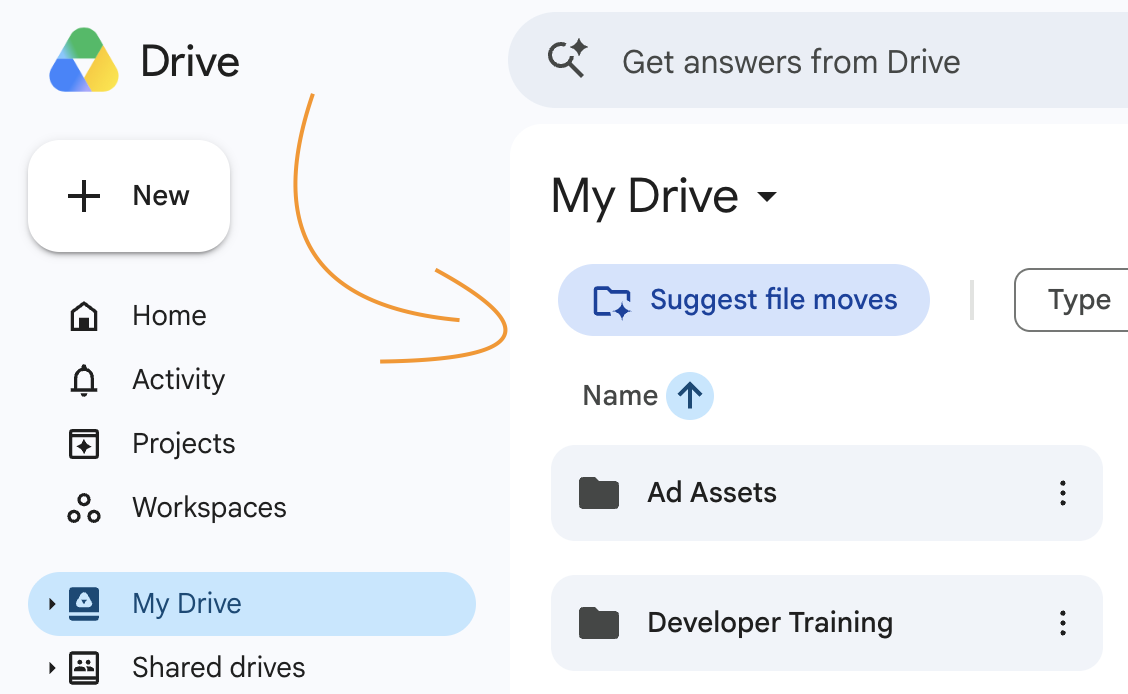
Find it. Open Drive in a browser and click My Drive. Near the top of the file and folder list, look for a button called Suggest File Moves (it also shows up inside parent folders). Click it, and an Organize My Files window opens while Gemini scans your loose files.
|
| |
|
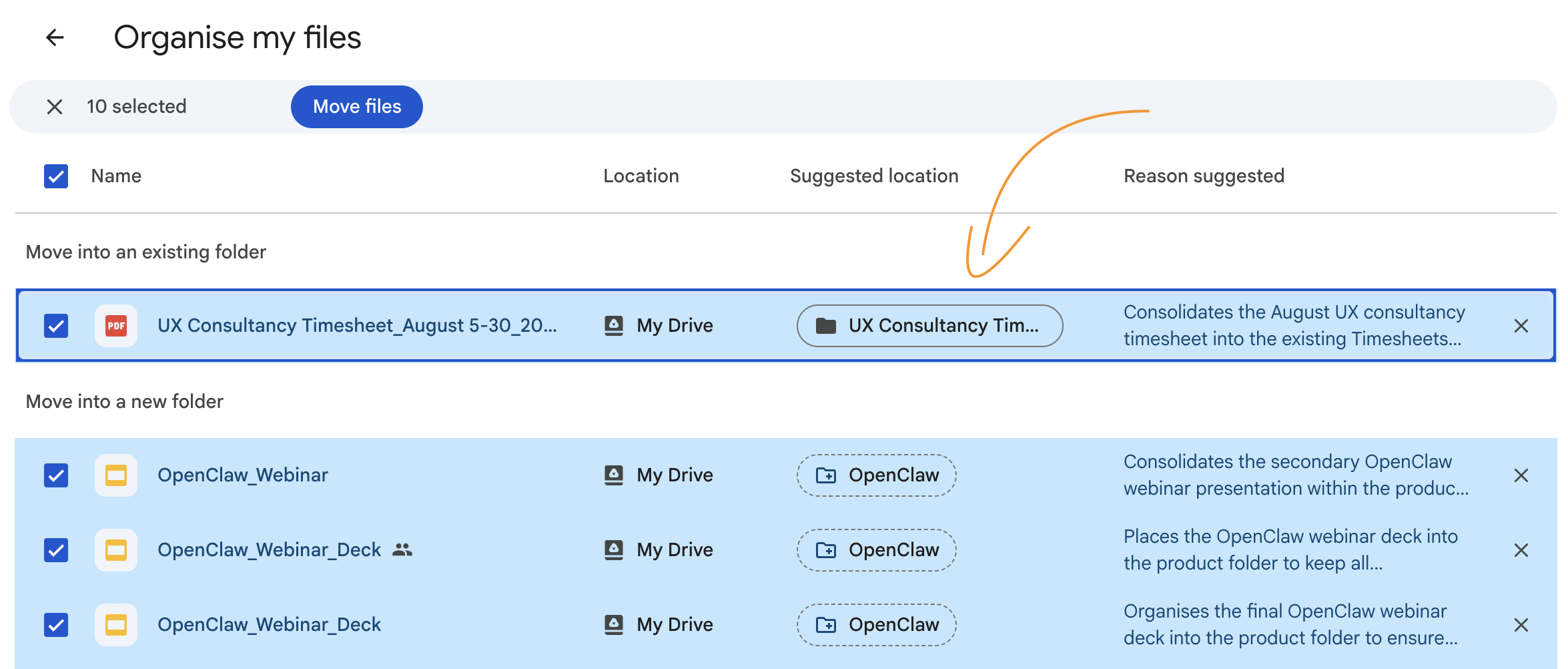
Review the plan. After a minute it hands back a plan, not an action. The suggestions come in 2 flavours:
|
| |
• Move loose files into folders you already have
• Create new folders for groups of related files
|
| |
|
Hover any file to preview it, or open it in a new tab to check before you decide.
|
| |
|
| |
|
Approve. Checkboxes let you accept or reject each move one by one. Rename a clumsy folder name, fix a wrong destination, then approve, and Gemini makes all the moves in one batch.
|
| |
|
On my first pass the sensible suggestions were genuinely sensible. It pulled loose documents into folders I already had, and proposed a couple of new folders for files it had grouped by reading what was inside them rather than just the filename. For 19 recent files, it did in a few clicks what I'd have put off for another month.
|
| |
|
Pro tip: Read the reason it gives for each move, not just the destination. That's where you catch the file it sorted off a keyword in the title instead of what's actually inside, which is the most common way it gets one wrong.
|
|
| |
|
Verdict: kept it, for small jobs. On a handful of recent loose files, it's a real time-saver, and the approval step makes it safe.
|
|
| |
|
|
|
| |
|
Attempt 2: The second pass forgot the first
|
| |
|
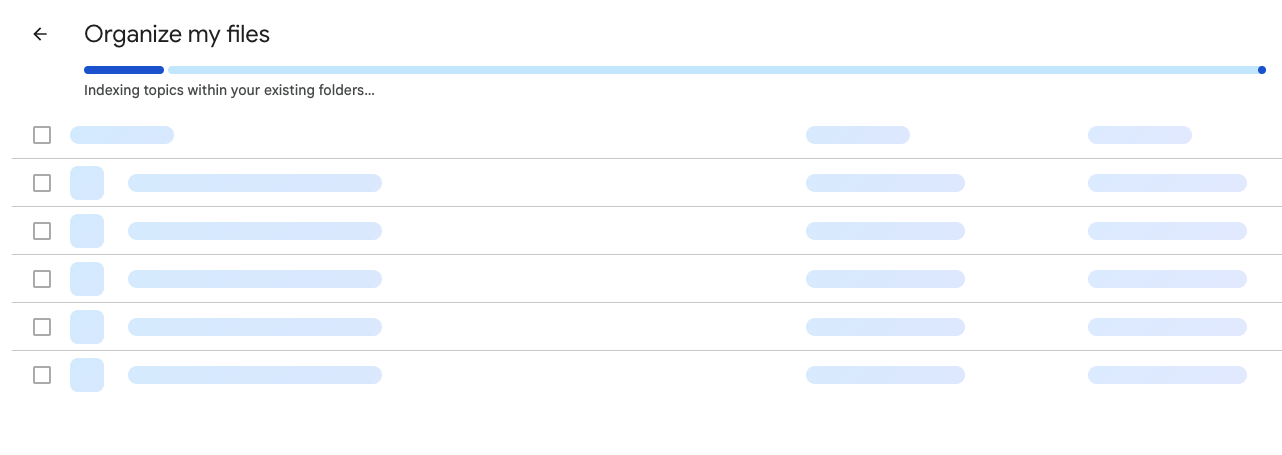
Here's the run that told me how early this still is. I approved the first batch, then ran the tool again to keep going. Each time, it shows a completion message, even though it's only done 19 files out of thousands.
|
| |
|
| |
|
It surfaced another 19. Different files this time, which was a good sign. But then it took a group of similar files and proposed a brand-new folder for them, files of the same type it had sorted into a folder one pass earlier. It didn't reuse the folder it had just created. It didn't seem to know that folder existed.
|
| |
|
Each run starts cold, with no memory of the organising it did 30 seconds ago. Run it twice and you don't get a coherent system, you get a pile of overlapping folders that each made sense in isolation and contradict each other together. I'd run it twice and already had 2 folders competing for the same kind of file.
|
| |
|
Context is king for a job like this, and the context isn't there yet.
|
|
| |
|
The model can sort 19 files in front of it. It can't hold the thread across passes to build something that hangs together as a whole. That's not a polish problem, it's the hard part of the whole feature, and it's the part that isn't working.
|
| |
|
Verdict: half-baked, today. Only 19 files at a time, no memory between passes, no overall structure.
|
|
| |
|
|
|
| |
|
Attempt 3: The scale problem
|
| |
|
| |
|
Now hold that against a real Drive. Mine has years of clutter across more folders than I want to count, and Organize My Files works folder by folder on loose files, in small batches, surfacing roughly 19 at a go.
|
| |
Reads: Docs, Sheets, Slides, PDFs, Office files, images, and videos with transcripts.
Skips: the random exports, archives, and media with no transcript, which is often exactly the space-hogging junk you most wanted gone.
|
|
| |
|
So the honest math: clearing a genuinely messy Drive this way means running the tool over and over, 19 files at a time, while each pass forgets the last and the folder structure slowly fights itself.
|
| |
|
That's not a cleanup tool. That's a part-time job with a Gemini logo on it.
|
|
| |
|
Verdict: not the sweeping Drive cleanup anyone's actually asking for. Not yet.
|
|
| |
|
|
|
| |
|
What survived
|
| |
|
Here's where I landed. This is a good small feature wearing a big feature's marketing. Point it at one folder of recent, loose, document-type files and it'll save you a couple of minutes and propose a tidy structure you can approve in seconds. Point it at the whole junk pile and it taps out at 19, then forgets where it was.
|
| |
|
It's a weekly 2-minute tidy of what piled up this week, not the one-click reckoning for the mess of the last decade. The people it genuinely helps are the ones already fairly tidy, who just want recent loose files swept into the right folders. The people it can't help are the ones who need it most, the years-deep junk pile. Used the right way it earns its place, and the approval step means it can't quietly misfile anything you can't see.
|
| |
|
This is Google, on Google's own storage, with Google's own model, and the safe, shippable version of "AI, clean my Drive" is a 19-file nibble with no memory between bites. Doing it at scale, with context held across the whole job, on files you can't easily un-move, is genuinely hard, and nobody has cracked it yet.
|
| |
|
One of the biggest companies on earth shipped a file-tidier that forgets what it did 30 seconds ago.
|
|
| |
|
We spend a lot of this year hearing AI is about to run everything. Then you watch that, and you get a truer sense of where things actually are. The capability is real. Holding context across a long job, the thing that would make this genuinely useful, is still being built, in public, one careful release at a time.
|
| |
|
|
|
| |
|
Try this now
|
| |
|
If you've got Workspace or Google AI access, don't point this at your whole Drive. Open one folder of recent loose files and click Suggest File Moves. Read the reason column, approve what's right, fix the folder names that aren't.
|
| |
|
Then do the test I did: run it a second time and watch whether it builds on the first pass or starts cold. That one move tells you, in 2 minutes, exactly how far along this really is, and whether it's a useful weekly habit for your Drive or a toy you'll abandon. While the promo caps are lifted through July 15, it costs nothing to find out.
|
| |
|
Happy spring cleaning.
|
| |
|




