Sponsored by

Hey folks,

Have you noticed your token consumption burning out on Claude lately? You're not alone. Over the weekend Anthropic officially acknowledged the problem on X and said it's now fixed, so get back to burning those tokens instead of waiting for your token session to reset.

Good timing though. ChatGPT 5.5 launched the same week and is making serious noise as the super app, with image generation that actually delivers what every demo has promised for 2 years: text rendered correctly inside the image, and characters that stay consistent across a set.

I've been running ChatGPT 5.5 alongside Claude all weekend and built a map of which one wins over various use cases and examples. Check them out below

Let's dive in..

Together with Maxio

What 2,000 SaaS Companies Reveal About Growth in 2026

Is your growth in-line with your peers in B2B SaaS & AI? 

Benchmark yourself against actual billings data for Maxio’s 2000+ global customers, alongside firsthand company perspectives to understand how growth varied by company size, business model, and strategic focus.

Key takeaways from the report: 

  • Average growth across 2,000 companies

  • Growth by revenue band 

  • AI-led vs AI-enhanced. Who performed better? 

 
What's changed in GPT-5.5
 
GPT-5.5 dropped last Thursday and the follow-on releases over the weekend turned it into something genuinely new. Three pieces matter for everything below.
 
The super app. ChatGPT, Codex, and the new Atlas browser are merging into one desktop workspace. Research a topic via Atlas, fold the result into a script via Codex, and hand it back to chat, all in one session. The vendor pitch: subscribe once, never switch.
 
Canvas + Codex. Canvas is the collaborative pane that sits next to chat. Codex (rewritten in Rust this quarter) is the agent that writes, tests, and debugs the code. Together they generate a working React app from a written brief, refine it inline, and produce a share link from the toolbar.
 
Images 2.0. The new image model. The big unlocks: text rendered correctly inside images (headlines, signage, week numbers, multilingual including CJK and Hindi), and up to 8 images in one prompt with consistent characters across the set. 4x faster than the previous version.
 
Who this is for:
Anyone who's been picking one AI subscription and forcing it to do every job.
 
What you need:
✓ ChatGPT Plus ($20/month) for the new model
 
What's still rough:
⚠ Images 2.0 wobbles on tiny UI text under 12px
⚠ Canvas-built apps wobble on edge cases beyond simple input/output
 
 
The map
 
Five amazing use cases shipped in public this fortnight, and which tool wins for each.
 
1. Image generation
 
Verdict: ChatGPT 5.5 (Images 2.0), outright.
 
Where's Wally 3D scene generated with ChatGPT 5.5 Images 2.0, hundreds of distinct characters in fine detail
 
Look at this Where's Wally 3D scene someone posted this week. Hundreds of distinct characters, fine detail across the whole frame, consistent illustration style, no melted typography. That's the proof of what Images 2.0 actually does.
 
Claude makes no raster images natively, so the comparison ends here. What's actually new: text rendered correctly inside images, and 8-image sets with consistent characters. You probably won't recreate Where's Wally on the first try, so start smaller. Copy-paste this:
 
Editorial illustration, 16:9, calm slate-blue and warm-cream palette. Render the text "Week of April 27" as a clean serif headline in the upper left, dark slate on cream. Below, a small abstract motif suggesting reflection: a calm wave receding, or a ribbon curling. No people.
 
Cost: 30 seconds. Saved you a Figma round trip.
 
Watch out: Images 2.0 is reliable on headlines and headers, still inconsistent on tiny body text under 12 pixels. Don't ask it to render fake dashboard UIs.


2. Design language for an app
 
Verdict: ChatGPT 5.5.
 
Alex Finn's demo of ChatGPT 5.5 extracting design language from an app screenshot
 
Alex Finn ran a clean demo this week: paste a screenshot of an app you like, ask ChatGPT 5.5 to extract its design language (color palette, typography, spacing, component vocabulary), and get back a structured spec you can hand to Codex, Claude Design, or a human designer.
 
The use case: you're building something new and want it to feel like Linear, Notion, or your favorite indie app. Skip the "what fonts do they use" detective work. ChatGPT pulls it from one screenshot.
 
Pro tip: Feed it 2 screenshots, not 1. Hero screen plus a settings page. The contrast helps the model generalize the system instead of describing the literal screen.


3. A music app, designed and natively built in React
 
Verdict: ChatGPT 5.5 (Canvas + Codex).
 
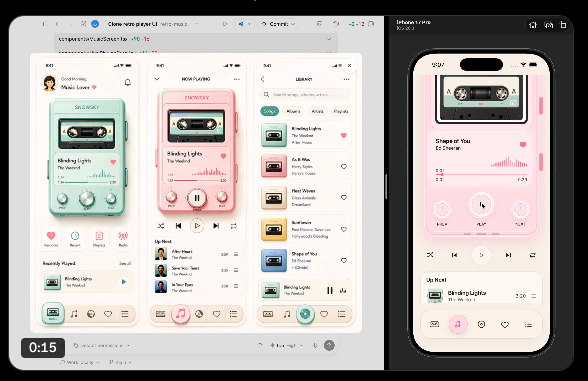
Working React music player built by Codex inside ChatGPT 5.5 Canvas
 
thebuggeddev shipped a working music player this week, designed and coded by Codex inside Canvas. Native React, real audio, real animations, real interactions. The kind of thing that used to take a developer a week.
 
The use case: prototypes that feel real, not Figma wireframes. If you've been pitching app ideas in mockup form, Codex now lets you ship a working version of the same idea in under an hour. Better demos, better feedback, better internal buy-in.
 
Watch out: The apps Codex generates work as prototypes, not production code. The output is real React, but you'll want a developer to review it before you put real users on it.


4. Long-form writing in your voice
 
Verdict: Claude (Opus 4.7).
 
I tested this newsletter in both this weekend: a 1200-word Beyond the Buzz issue written in my voice, with my voice file loaded as context. Opus 4.7 nailed the rhythm on the second pass. ChatGPT 5.5 produced a clean draft, but the cadence was generic and the AI tells were back. If you've spent time training a voice file, that work is portable to ChatGPT, but you'll spend longer correcting tone than you would have spent writing it yourself.


5. Build a shareable web app from a prompt
 
Verdict: Tied. Picks differ by what you want next.
 
ChatGPT Canvas+Codex if you want a share link in 20 minutes that someone can open and use immediately (the music app in Use case 3 is the proof). Claude Design+Code if you want the design to look right out of the gate and you want a clean handoff to an engineer. I would used Canvas for prototypes I'll throw away. I will still use use Claude for prototypes I think might survive.
 
 
Everyone wants one AI
 
There's a piece by Ruben Hassid called "Everyone Wants One AI" that landed for me this week. His framing: every vendor pitches you converge on us. ChatGPT is positioning as the super app, merging chat, Codex, and the new Atlas browser. Anthropic is positioning Cowork as the everything-folder. The sales pitch on both sides is the same. Subscribe once, never switch.
 
I keep thinking about how much that pitch contradicts what actually works. The heaviest AI users I know run 3 to 5 tools and pick per job. They don't have a favorite. They have a map.
 
This is the map for April. It will not be the map in June. The Images 2.0 lead Claude has no answer to right now will probably get answered. The Claude Design lead ChatGPT hasn't matched will probably get matched. The skill isn't loyalty. It's keeping the comparison fresh.
 
 
Try this now
 
Pick one of the 3 ChatGPT 5.5 capabilities above and run a smaller version on your own work today.
 
For image gen: run the prompt in Use case 1, or push it further with "busy crowd scene" added and see how close to Where's Wally you get.
 
For design language: take a screenshot of an app you admire and ask ChatGPT 5.5 to extract its design system. Save the response as a brand notes file you can reuse forever.
 
For app building: open Canvas and ask Codex to build a tiny React app you'd actually use, like a habit tracker, a recap card, or a meeting timer. Share the link with one person.
 
Pick one. Run it before you close the tab. Hit reply with what you made.
 

👉 Know someone drowning in AI news? Forward this to them or send your unique referral link

Cheers, Tim

Keep Reading